Note: Your VIN must be entered in MTune to be broadcast on the CAN, see below.
Inputs.
•All four individual wheels speed from stock ABS into MaxxECU traction system.
Outputs.
•Instrument cluster (Speed, RPM, CEL, water temp, battery, overheating, odometer etc.)
•VIN broadcast on the CAN.
•Boost gauge
Optional CAN.
•OEM traction control button can be used to enable/disable MaxxECU traction capabilities.
•OEM AC button is used for AC request/idle up.
Not working/issues.
•TPMS calibration not supported, use stock ECU to calibrate TPMS.
•Ford diagnostics, use stock ECU to diagnose vehicle, since FORD IDS wont continue diagnose the vehicle if no stock ECU found.
•Low fuel level indicator might light up earlier than it should, because of the non implemented fuel consumption in the CAN system.
Changelog
•Initial support added.
•Added enable/disable options for brake switch, clutch switch, vehicle/wheel speed, ESP/DSC/TC button, AC switch, and cruise buttons for this CAN protocol - previously these signals were always captured automatically when available.
•Restricted this CAN protocol to listen only on its configured CAN bus (on dual-bus ECUs) to prevent conflicts and isolate buses.
Confirmed to work models
•AR3A-12A650-AFH
Note: If you experience problems with ABS/Traction warning issues, please contact us!
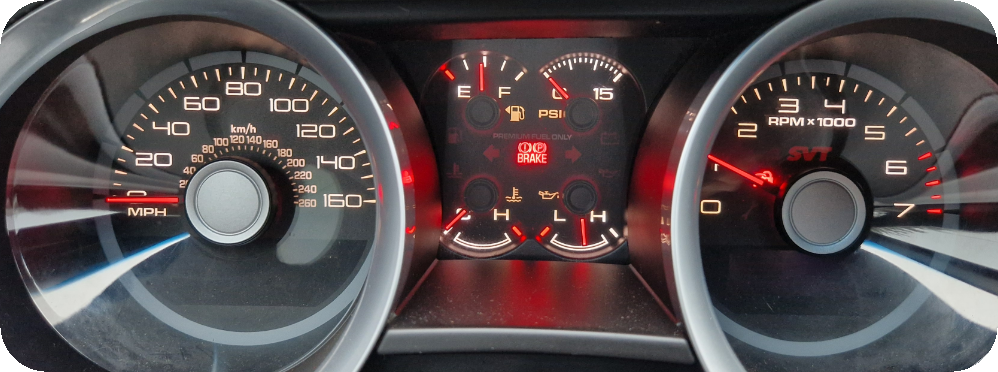
Instrument cluster with boost gauge support found in the Ford Mustang GT500 2010.
Vehicle Identification Number (VIN Broadcast on the CAN)
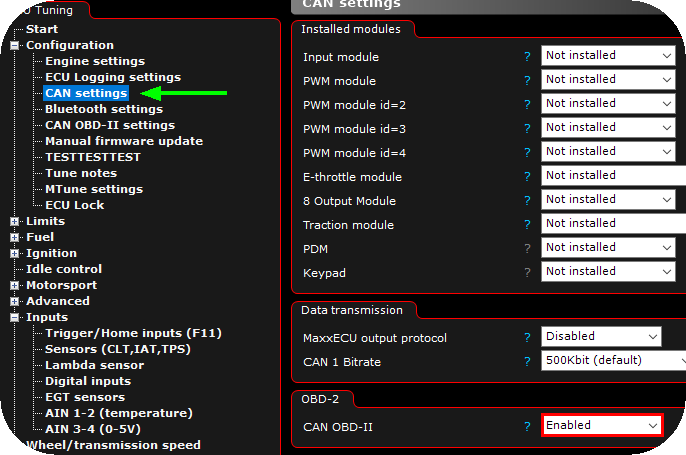
1. Enable the OBD-II protocol
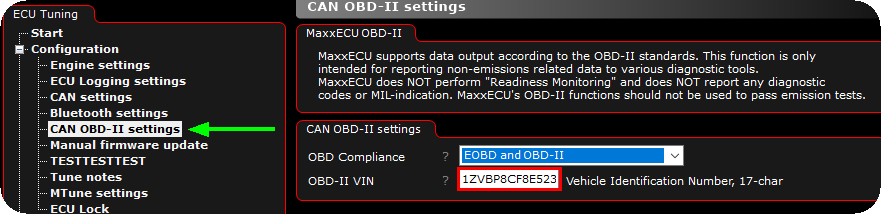
2. Enter your VIN in the input box, make sure to enter all 17 characters. After you have entered your VIN, you can now safely disable the CAN OBD-II output protocol...
Note: Fail to enter the correct code above, will result in DTCs on device on your vehicle CAN.
Wheel circumference must always be calibrated using an OEM CAN protocol
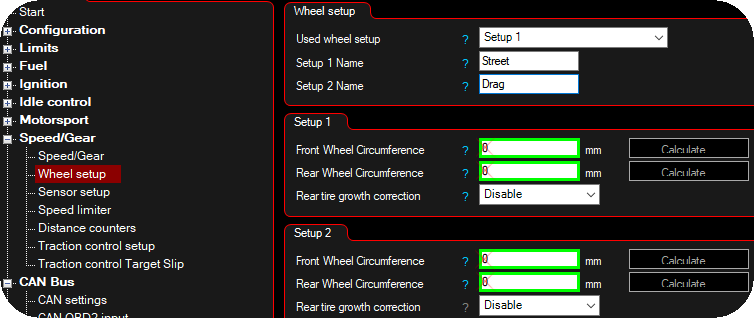
When we calibrate the wheel speeds from an OEM vehicle (to make an OEM CAN Protocol), we always use the stock wheel sizes, so to get correct wheel speeds within MaxxECU, you must calibrate your wheel dimensions, since they are used to show you the correct speed in MaxxECU.
Help and contribution
Eivind Skeie, ELS Tuning, Norway